AN INQUIRY ASSISTANT FOR AIRBNB HOSTS

Leave repeated questions to Bizard.
Keep the important decisions.

From parking to check-in, it answers guests from your listing info.
You focus on the inquiries that need you.

Available on Microsoft Store / Windows 10/11, Chrome required

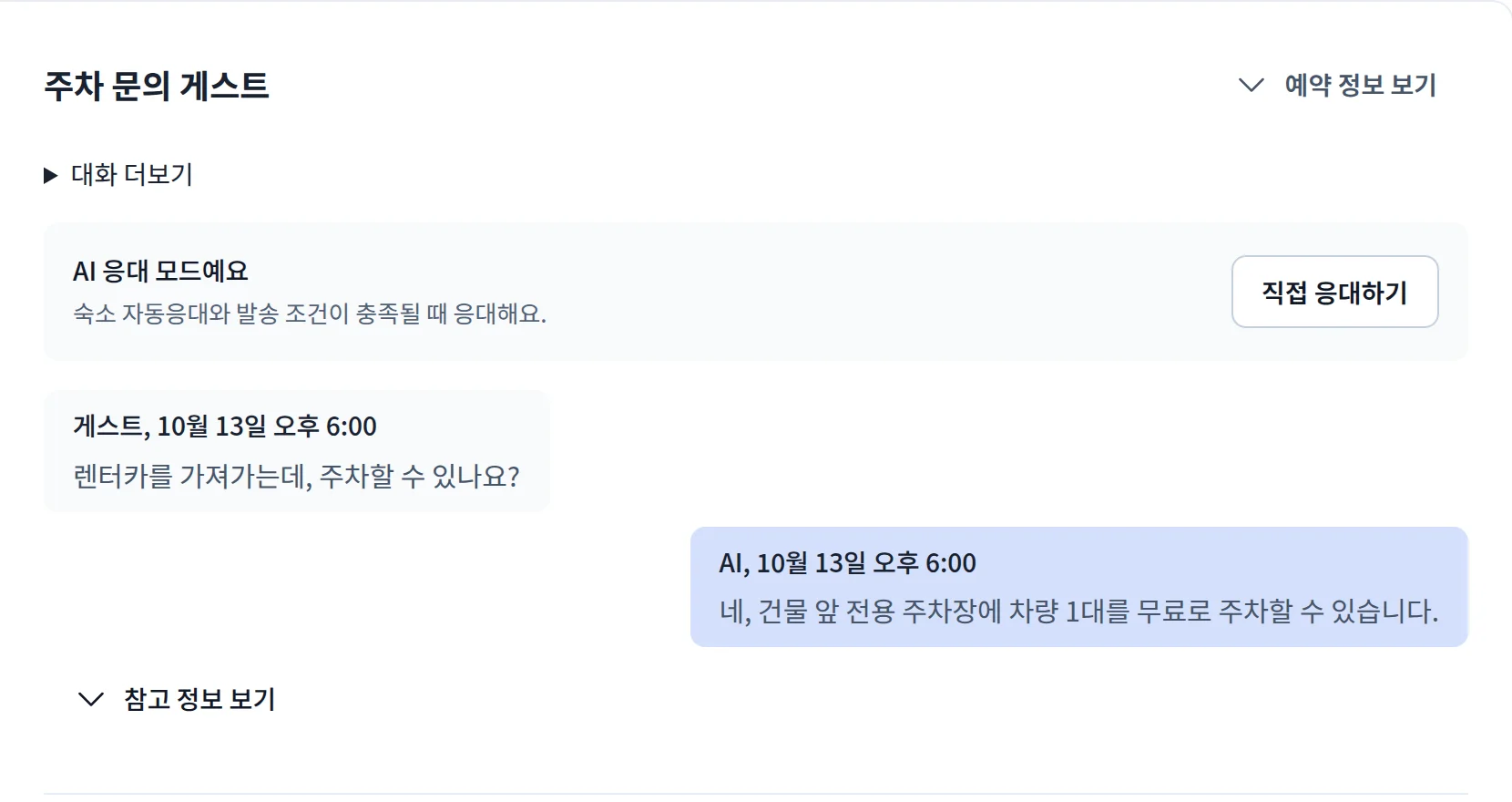
A parking inquiry for the example house and the reply based on listing info
Inquiry and reply on one screen
Time spent answering inquiries,
back to caring for your place.
SCROLL TO EXPLORE

Reading every inquiry,looking up your listing info,and writing the same answer again.

Hand over the repeated answers
and spend your time where you are needed.

How one inquiry gets handled

Answer with what you know.
Pause when it matters.

Scroll to follow the reply process.

Parking example

  1. 01

    When an inquiry arrives

    Bizard checks new inquiries on your connected Airbnb. Start with common questions like parking and check-in.

  2. 02

    It looks up your listing info

    It finds the parking and check-in details you saved. If nothing fits, it hands the inquiry to you.

  3. 03

    It writes a reply that fits

    When there is information to share, it writes a reply to the question. Requests that need judgment go to you.

  4. 04

    It replies only within the scope you set

    In auto-send mode it sends approved answers. You review refunds and exceptions, and draft mode never sends.

Bizard. Jeju Breeze HouseExample screen

STEP 01 / Inquiry

G

I'm bringing a rental car. Is there parking?

New guest inquiry

Bizard picks up the inquiry from your connected Airbnb.

STEP 02 / Look up

G

I'm bringing a rental car. Is there parking?

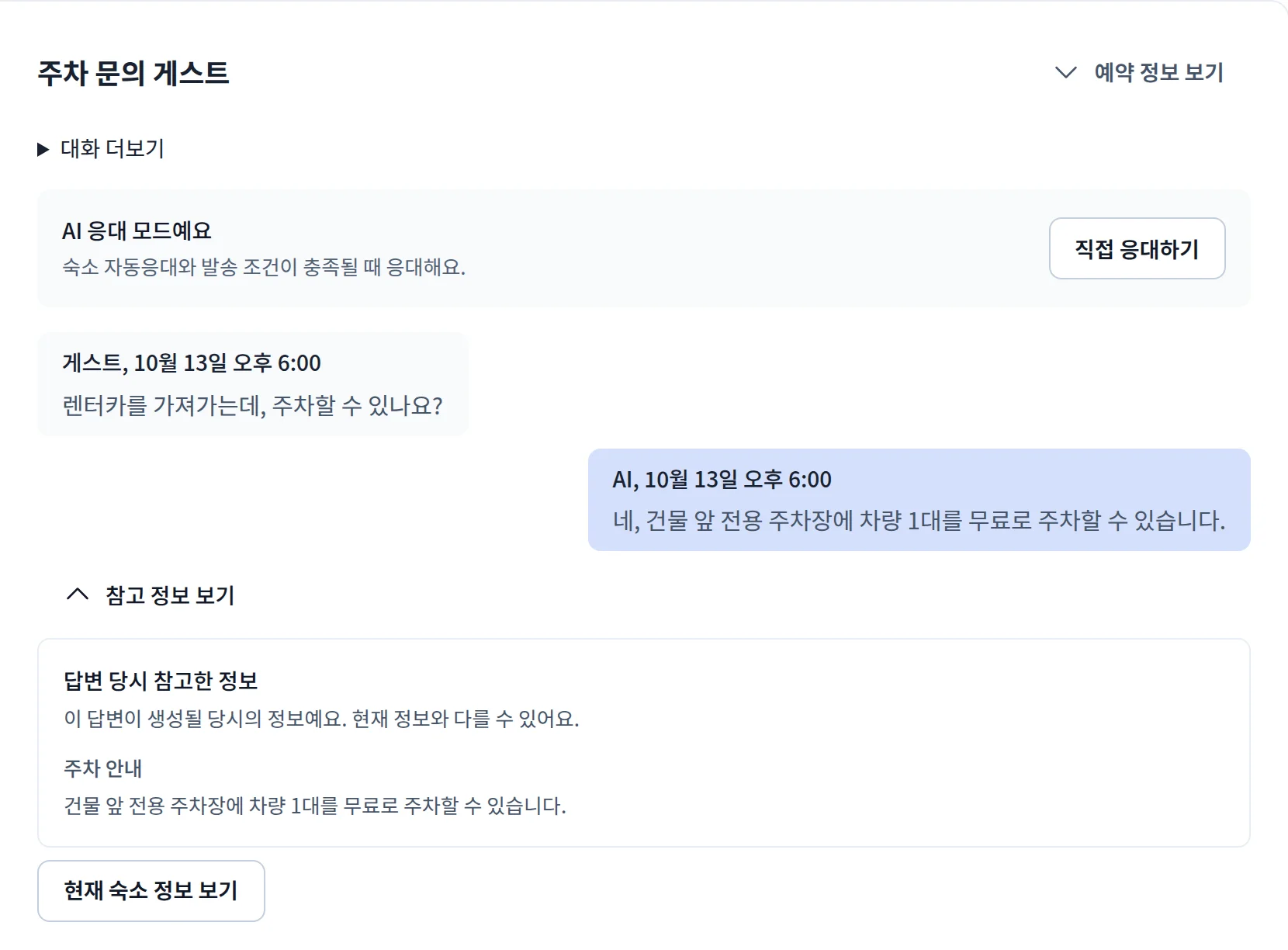
Source: Parking

Info saved for your listing

You can park one car for free in the private lot in front of the building.

STEP 03 / Reply

G

I'm bringing a rental car. Is there parking?

Example reply to the guest

Yes. You can park one car for free in the private lot in front of the building.

Draft reply example

STEP 04 / Send or review

G

I'm bringing a rental car. Is there parking?

Example reply to the guest

Yes. You can park one car for free in the private lot in front of the building.

Auto-send example

It only acts within the reply scope you set.

Import your Airbnb listing
and fill in the gaps.

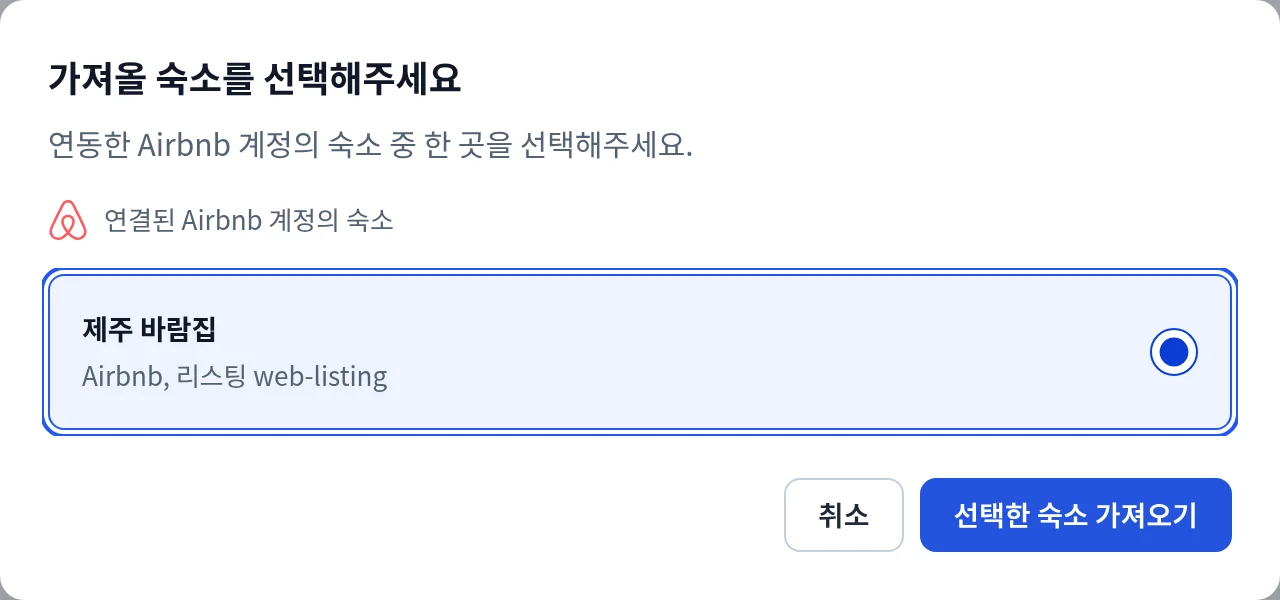
Bring in your Airbnb listing info
and add what guests need to know.
01

Connect your listing

Importing Jeju Breeze House from Airbnb
Start with the listing you already have

Start from the listing you already have.
No need to type the same info again.
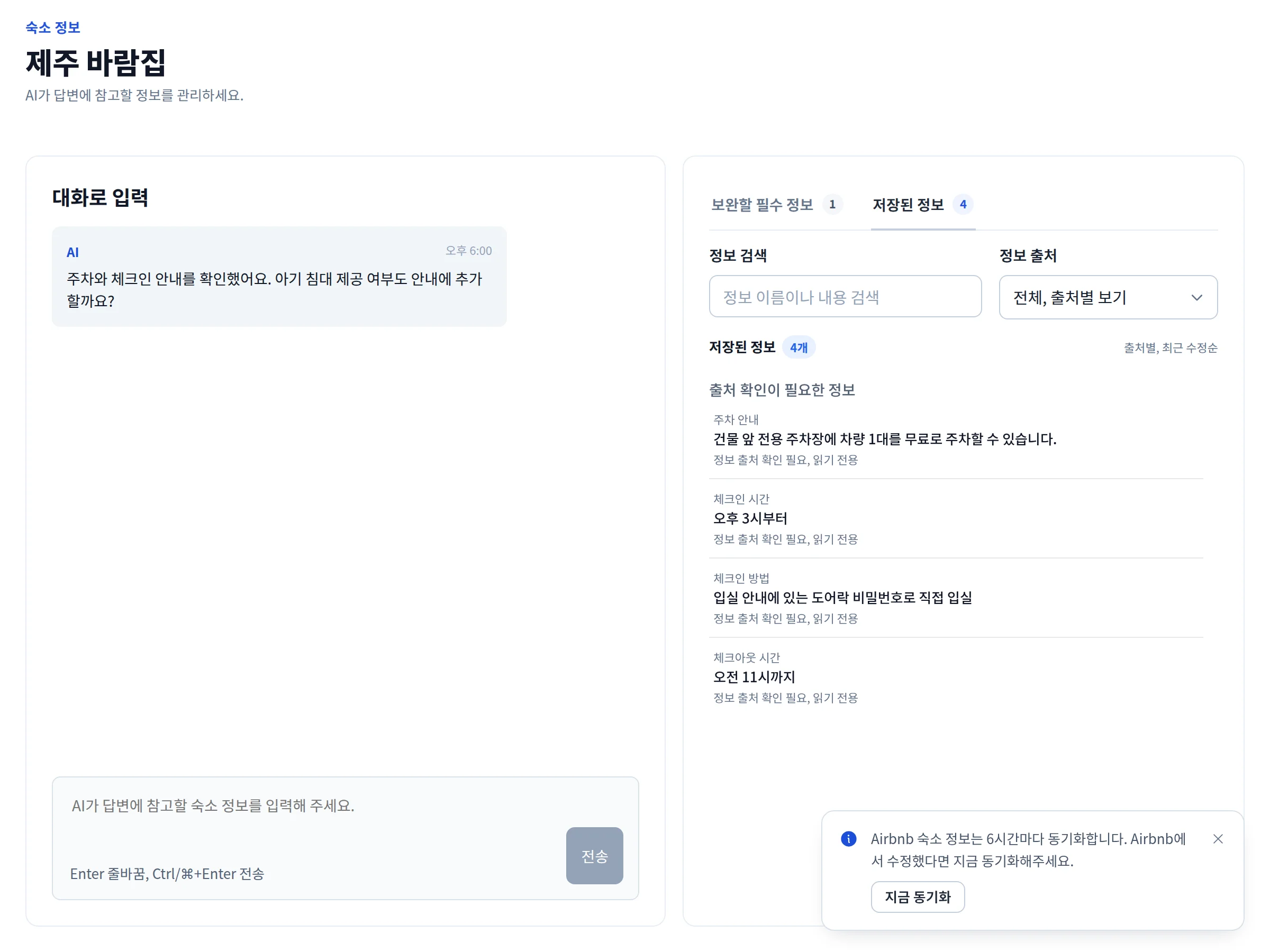
02

Add only what is missing

Reviewing parking and check-in info and filling in what's missing
Add only what's missing

Check details guests often ask about, like parking and entry.
Accurate listing info is where good answers start.

Before you hand it over,
check and decide yourself.

Test replies, see the info behind them,
and choose how much to hand over.

01

Test replies for your own listing first

Before turning on auto-send, try parking or check-in questions. If something is missing, add it to your listing info and ask the same question again.

02

See which info each reply used

Expand the info a reply was based on, and check whether anything has changed in your listing since.

See an example reply ↗
03

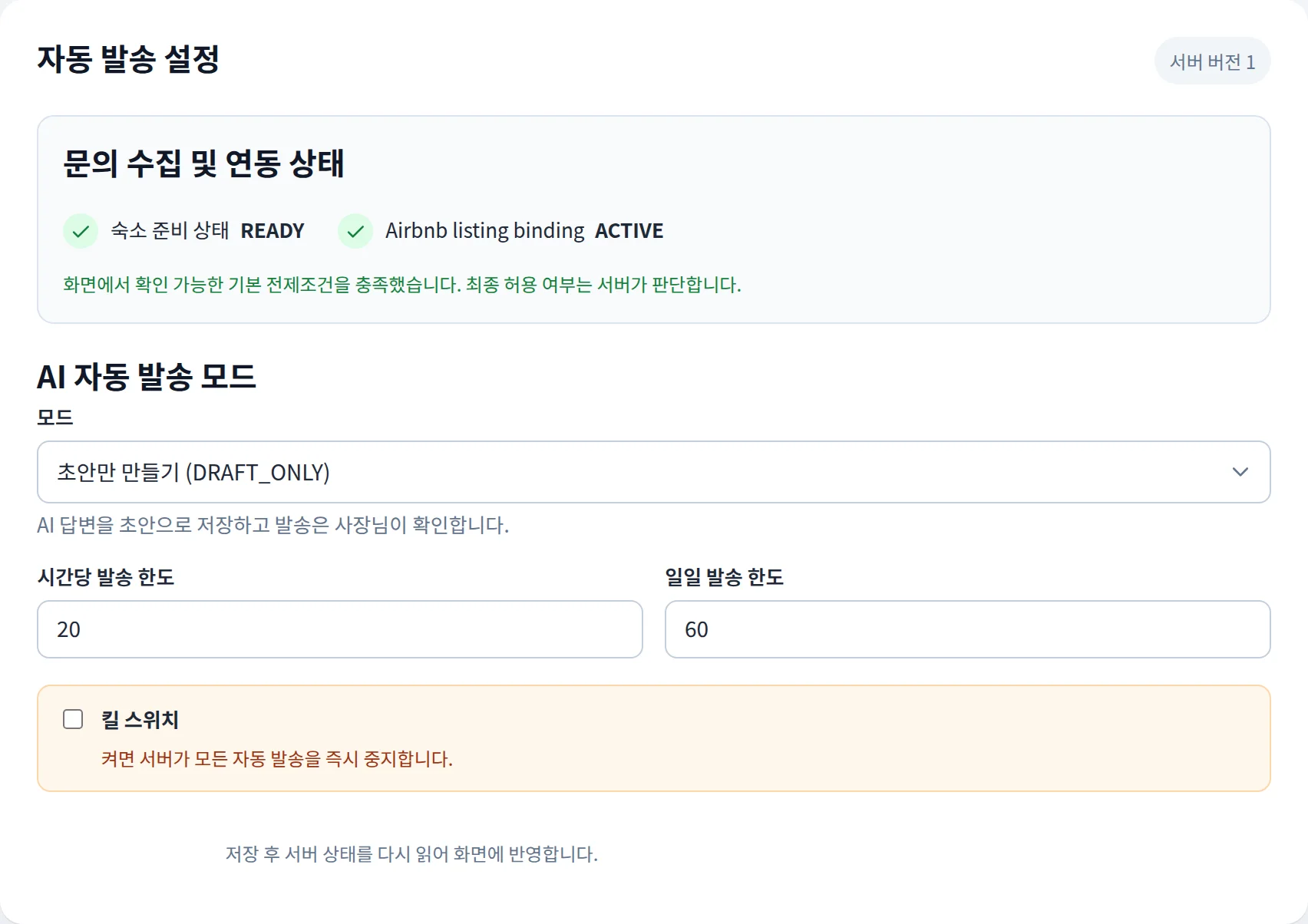
Choose how much to hand over

Start by reviewing drafts, then auto-send only approved answers once you are comfortable.

How each reply mode writes and sends replies
Reply modeReplies and sending
OffNothing is sent automatically.
Auto-sendOnly approved answers are sent. The host reviews refunds and missing info.

You can stop auto-send in settings at any time.
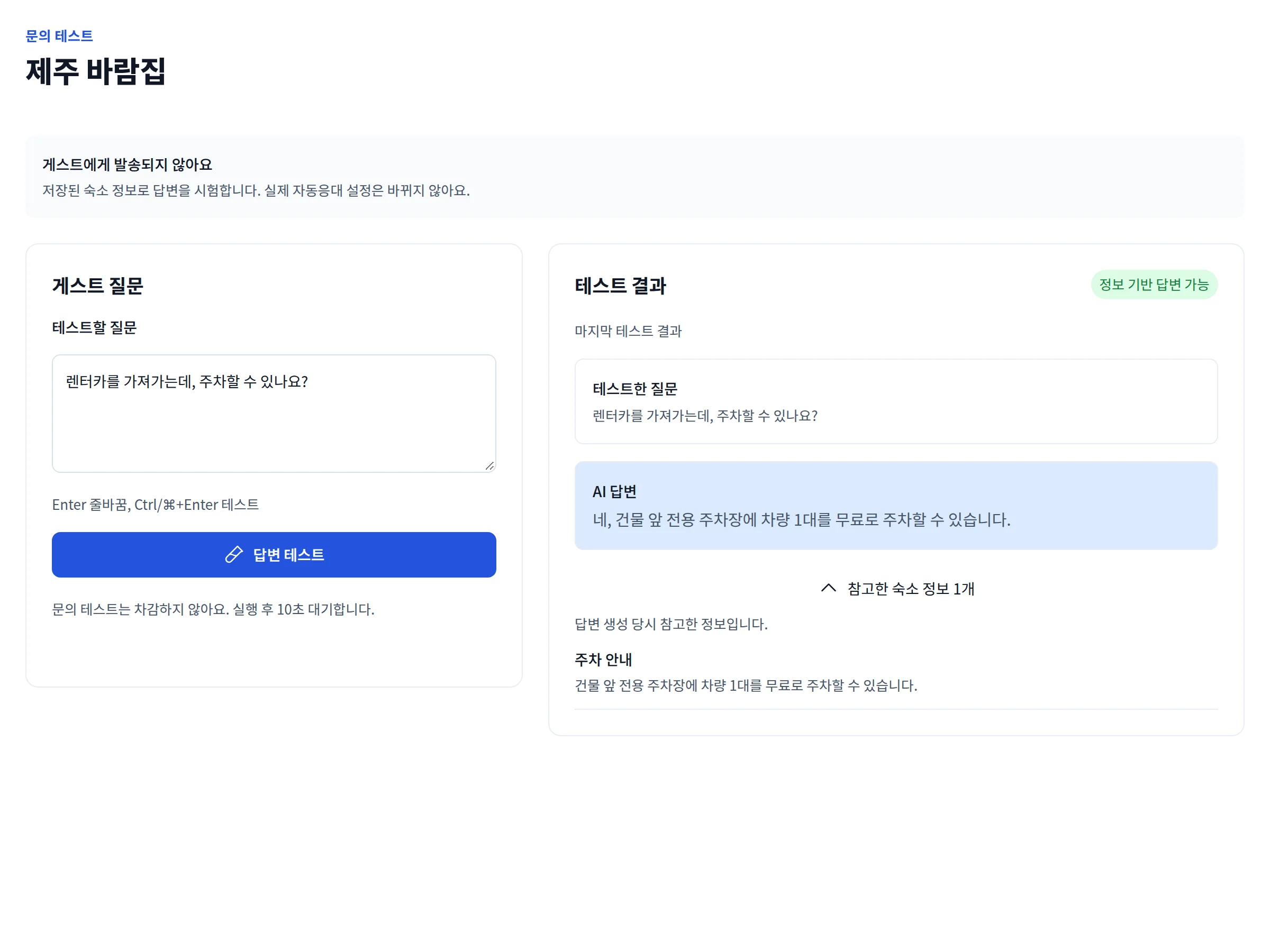
Testing a reply with saved parking info and checking the source
Test before you auto-send
The listing info used for a parking reply, expanded under the reply
The info behind each reply
Choosing between off, drafts only and auto-send
Choose how much to hand over

Repeated answers handled,
only what needs you stands out.

Parking and check-in from your saved info.
Refunds and exceptions are your call.

Jeju Breeze House, 4 example inquiries

G
Is there parking?Answered with your parking info
Repeated answer
G
What time is check-in?Answered with your check-in info
Repeated answer
G
Can I get a full refund?Please review exceptions yourself
Host review
G
Do you have a baby crib?Not in your listing info
Add info

2 repeated answers handled, 2 need your decision or more info.
An example assuming auto-send mode, not real results.
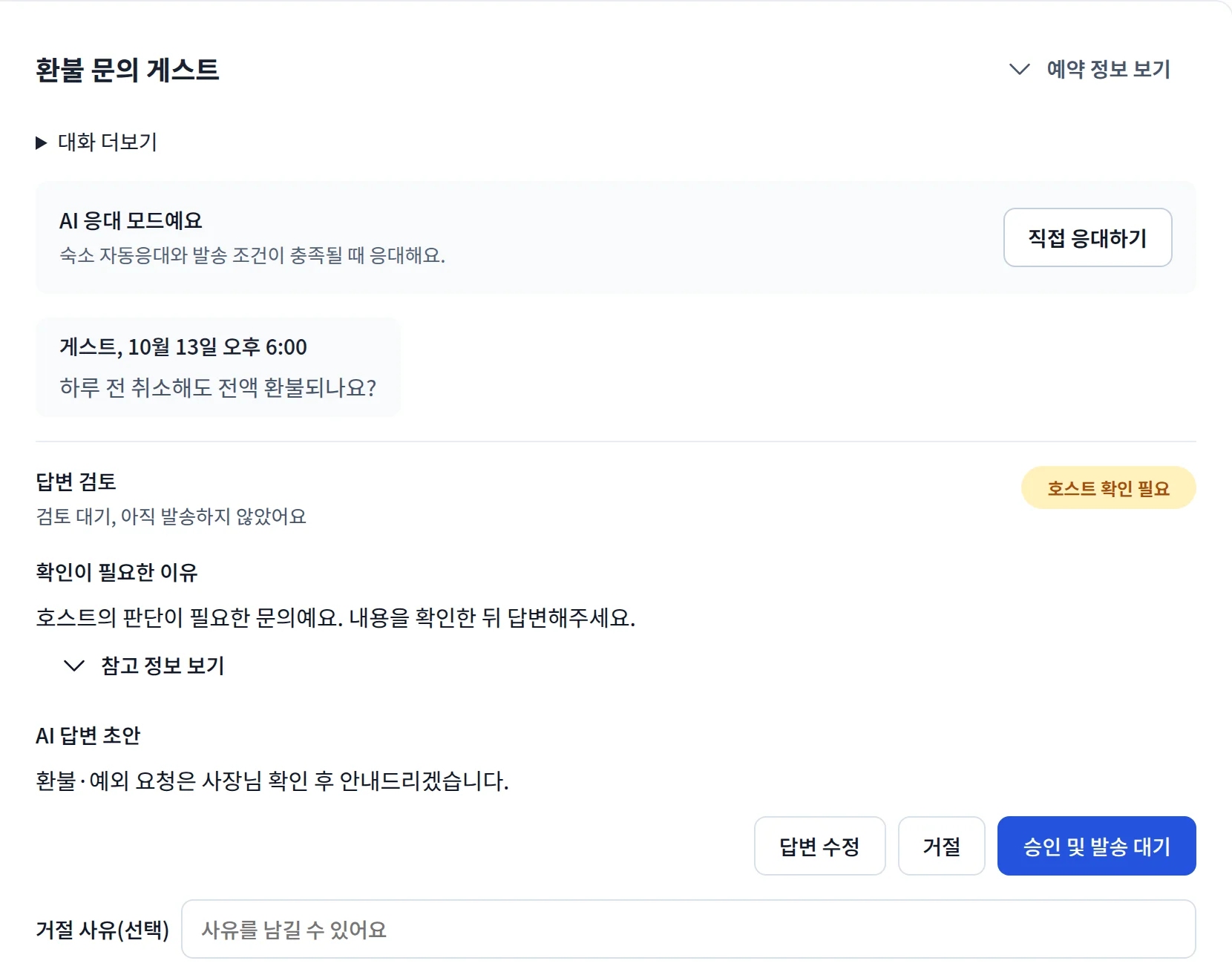
A refund request held for host review instead of being sent
You make the important calls

Less time rewriting answers,
more time welcoming guests.

See what was handled
and what still needs you.

Browse inquiries and their status
to find what you should check yourself.
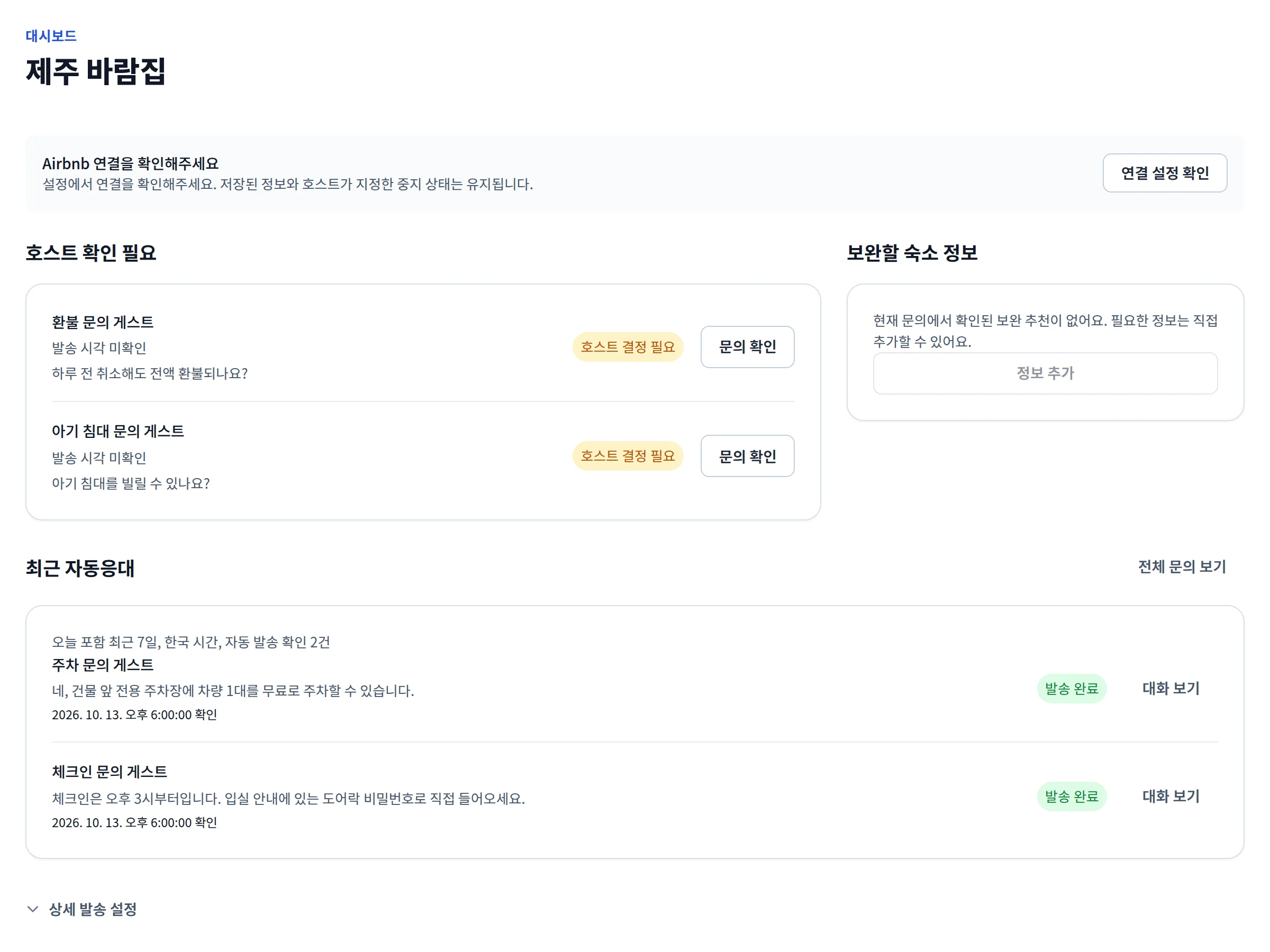
A dashboard separating handled inquiries from ones that need the host
See what needs you at a glance

How would you
answer this?

Bizard answers from your listing info
and stops when you need to decide.

Jeju Breeze HouseFictional house, fixed simulation
G

Guest inquiry, Parking

I'm bringing a rental car. Is there parking?

b.

Example reply to the guest

Auto-send example

Yes. You can park one car for free in the private lot in front of the building.

An approved answer sent in auto-send mode.

Show the listing info it used
Parking
You can park one car for free in the private lot in front of the building.
G

Guest inquiry, Check-in

What time does check-in start?

b.

Example reply to the guest

Auto-send example

Check-in starts at 3 PM. Let yourself in with the door lock code in your check-in guide.

An approved answer sent in auto-send mode.

Show the listing info it used
Check-in
Check-in starts at 3 PM. Let yourself in with the door lock code in your check-in guide.
G

Guest inquiry, Refund request

My plans changed. Can I get a full refund if I cancel a day before?

H

Note shown only to the host

Host review needed

Refunds and exceptions need your decision. Please review the request and reply yourself.

This note is never sent to the guest.

Show the listing info it used
Host decision
The host decides on exceptional refunds.
G

Guest inquiry, Missing info

Can I borrow a baby crib?

H

Note shown only to the host

Listing info needed

Your listing info doesn't mention a baby crib. Bizard won't guess and asks you to check instead.

This note is never sent to the guest.

Show the listing info it used
Info to check
Baby crib: not in your listing info
G

Guest inquiry, Draft mode

I'm bringing a rental car. Is there parking?

b.

Draft reply to the guest

Draft saved, not sent

Yes. You can park one car for free in the private lot in front of the building.

A draft before the host reviews and sends it.

Show the listing info it used
Parking
You can park one car for free in the private lot in front of the building.

This is a demo. It is not connected to an AI server or an Airbnb account, and no messages are sent.

How much time
could you get back each month?

Estimate the time you spend on repeated answers
with your own numbers.

Example numbers, not actual customer results

With these numbers, estimated hours saved per month

10.5 hours

Assumptions and formula

20 × 60% × (120 s − 15 s) × 30 days ÷ 3,600 = 10.5 hours

An estimate based on your inputs. It excludes setup time such as organizing listing info, and is rounded to one decimal place. If review time is equal to or longer than replying yourself, it shows no savings.

Have a
question?

Read the install guide ↗
What is Bizard?

A desktop app that answers Airbnb guest inquiries using your listing info. It handles repeated questions and leaves inquiries that need more info or a decision for you to check.

How much does it cost?

The monthly plan is KRW 9,900 for 100 AI replies sent, and the extra pack is KRW 6,900 for 50 replies (VAT included). Only AI replies actually sent to guests are counted, and you can get a full refund within 14 days of payment.

Does it reply to every inquiry automatically?

No. It follows the reply mode and scope you choose. Refunds, exceptions and inquiries without enough info need your check. If auto-send feels like too much, start with drafts only.

Do I have to enter my listing info from scratch?

It imports the listing info you already have on Airbnb, and you can add details like parking and check-in. Check that the imported info is accurate and up to date first.

Does it work when my computer is off?

Bizard and its Chrome window must be running on the computer where it is installed, with internet and Airbnb connected. Nothing is answered while the PC is off or disconnected.

Is the demo on this page real AI?

It is a fixed simulation using a fictional house, Jeju Breeze House. It doesn't connect to an AI server or an Airbnb account and sends no messages.

Which computers can I install it on?

Windows 10/11 64-bit with Google Chrome. There are no macOS or Linux installers. Install it from Microsoft Store, which also keeps it up to date.

Fewer repeated answers.
More time for hospitality.

Connect → check your listing info → choose the reply scope.
Start slowly with draft mode.

Get it on Microsoft Store